CRF Annotator
Annotate CRFs to SDTM in the browser — with a stated reason on every label.
What it does
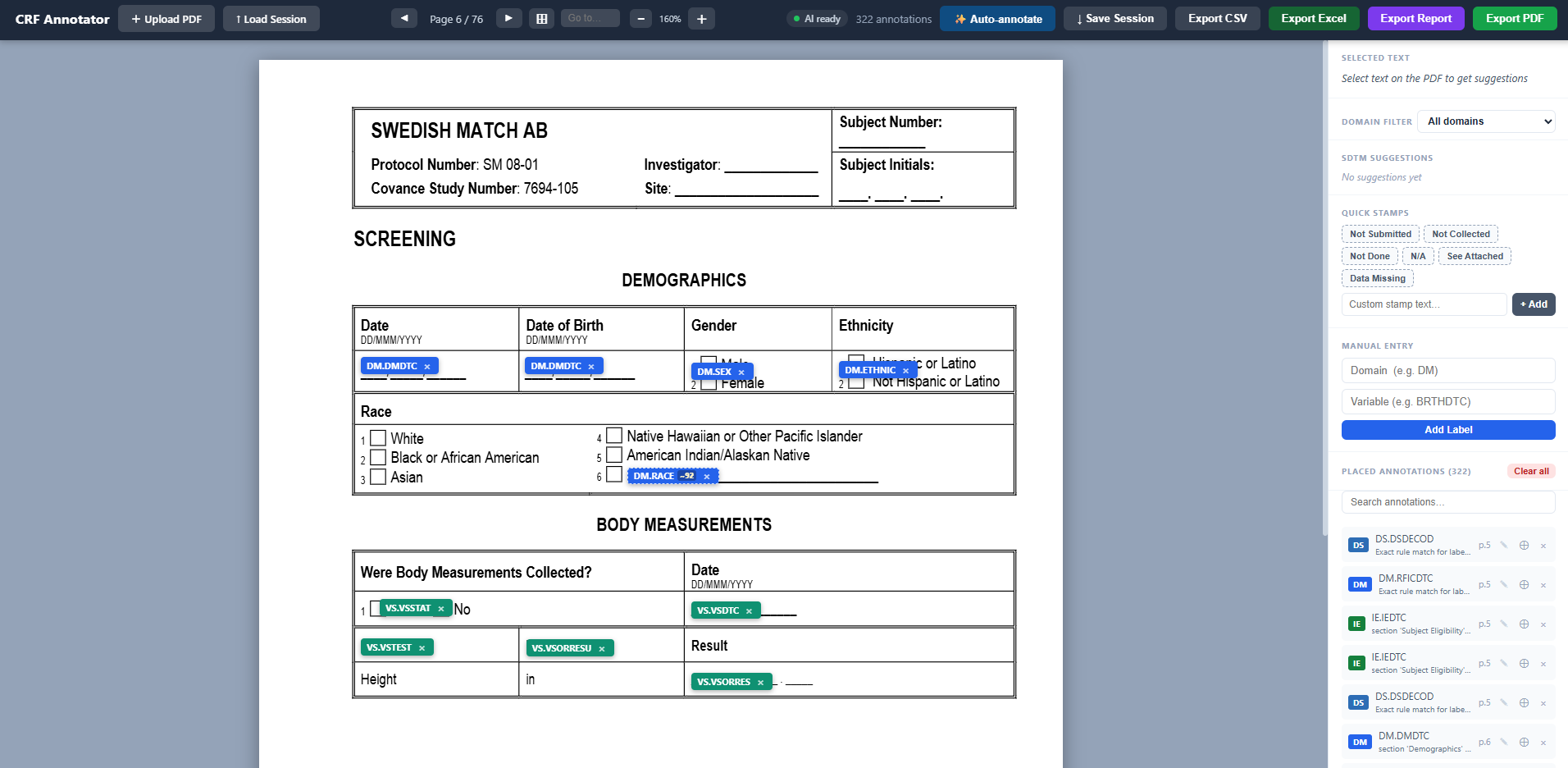
The CRF Annotator produces the SDTM-annotated CRF (aCRF) that accompanies a CDISC submission. Upload a CRF PDF, and every detected field is offered an SDTM domain. Variable suggestions come from three sources, and the UI shows which one produced each: Rule—an exact match from a curated table of common CRF phrasings (shown as a certain match, confidence 1.0). Context—the field's position: the governing section heading fixes the domain (the same "Date of Onset" is MH.MHSTDTC under Medical History and AE.AESTDTC under Adverse Events), and the table column fixes the variable role (Parameter → --TEST, Unit → --ORRESU, Result → --ORRES). AI—a local biomedical sentence-embedding model—scores the field against 1,465 SDTM v3.4 variables across 49 domains. AI suggestions are visibly flagged as suggestions with their confidence so a reviewer knows what to verify. Every annotation carries a one-sentence reason ("section 'Medical History' governs domain MH; the 'Date of Onset' column is the start/onset date → MHSTDTC"). The reason travels with the annotation into the tooltip, the sidebar, the CSV, and the PDF audit report, so the finished aCRF is reviewable, not just labelled. Reviewer workflow: select text on the PDF to get suggestions, click to place a label, drag to position, add notes, propagate a label across visit pages, stamp fields as Not Submitted / Not Collected, and track Required/ Expected variable coverage per domain. Sessions autosave in the browser. Exports: annotated PDF (labels burned in), Excel workbook, CSV with source, confidence, and reason columns, and a multi-page PDF summary report with per-domain coverage. Runs entirely on the user's machine: no API key, no cloud, no data leaves the device. Available as a web app and as a self-contained Windows folder that needs no Python and no internet. API can be added based on request.
Problem solved
Creating the annotated CRF is slow, manual, and inconsistent: a data manager reads every field, decides the SDTM variable from memory of the IG, and types the label into a PDF editor. The decision behind each label is rarely recorded, so review and rework at submission time to re-derive it. The CRF annotator makes the first pass in minutes, keeps the reviewer in control of every label, and records the rationale so the aCRF is defensible.
Best suited for
Best suited for clinical data managers, SDTM programmers, and CDISC standards specialists producing aCRFs for new studies, especially at CROs and sponsors that annotate many similar CRFs and want consistency across them. Also useful for reviewing a vendor-supplied aCRF.
Typical use
1. Upload the blank CRF PDF (any EDC's PDF export). 2. Click Auto-annotate for a first pass, or select fields one at a time. 3. Review: certain matches need a glance; AI-flagged suggestions get checked. 4. Correct, add notes, mark not-submitted fields, and propagate across visits. 5. Export the annotated PDF for the submission package and the CSV/report for the reviewer's file.
Deployment
Downloadable
Implementation
A practical view of what it may take to use this product in your environment.
Implementation requirements
- 64-bit Windows 10/11 for the portable app (~1 GB on disk
- 4 GB RAM recommended; first start loads the model in 20–40 s).
- Any OS via Docker for the web version.
- Modern browser (Chrome/Edge).
- No internet required at run time.
Technical considerations
- Field detection quality depends on the PDF: text-layer and AcroForm PDFs work best; scanned forms need OCR (Tesseract) and are less accurate.
- Auto-annotate is a first pass
- not a finished aCRF. On our 76-page benchmark CRF
- it currently agrees with an expert hand annotation on roughly a quarter of field-level variables; coded option groups (e.g.
- adverse event severity and causality) are the main gap. Human review of every page is expected
- and the UI is built around it.
- The rule table and gap analysis cover 14 domains (DM
- VS
- AE
- CM
- LB
- EX
- DS
- IE
- MH
- EG
- PE
- QS
- SU
- EC); the AI catalog covers all 49.
- Uploaded PDFs on the hosted demo are ephemeral (lost on restart); sessions persist in the browser and can be restored by re-uploading the same PDF.
Compliance & validation
Product information below is creator-supplied unless ClinExchange explicitly states otherwise.
21 CFR Part 11
CRF Annotator is a design-time aid for producing the aCRF; it does not hold subject data, does not create or alter clinical records, and its output is reviewed and approved by a human before use. No electronic-signature or audit-trail claims are made under Part 11. Each annotation does carry a stated reason and source for review traceability.
Validation & review information
- Validation available: No / not stated
- Security review available: No / not stated
- Privacy: Input is a blank CRF template—it contains no subject data. Processing is entirely on the user's machine (portable app) or the user's own container (Docker). No PDFs, annotations, or telemetry are transmitted to the creator or any third party. The public demo stores uploaded PDFs temporarily in the container and discards them on restart.
Evidence
Expert benchmark
A 76-page public sample CRF (Swedish Match SM 08-01) was hand-annotated field-by-field (838 entries, each with the governing section and a stated reason), independently of the tool. Auto-annotation is measured against it by SDTM variable per page; the script and reference are published with the software so results are reproducible.
Measured improvement
Over one review cycle, agreement with the expert benchmark rose from 17% to 26% while wrong-but-confident labels fell (extra annotations 105 → 87), by adding section- and column-aware annotation and removing rules that pointed at variables not in SDTM v3.4.
Traceability
100% of auto-annotations carry a source (rule / context / AI), a confidence, and a one-sentence reason, exported with the CSV and PDF report.
Offline operation
Runs with no internet and no API key: the 420 MB biomedical embedding model and the 1,465-variable SDTM catalog are bundled. Verified on a clean Windows machine from the portable folder.